Polish Pass — Making Expo Home Screen Widgets Actually Readable

· One min read
Mike Homol
Principal Consultant @ ThreeWill

After the SDK 55 revival, the next problem was not “do widgets render?” — it was “can you read them at a glance?” Trimming the set and using a consistent brand mark beat shipping every layout variant.

What happened​

  • Wired shared skull PNGs through the widget snapshot builder for completed goals
  • Clarified week/dreams layouts and trimmed the overall widget set
  • Fixed TestFlight margin gates for fewer widgets
  • Confirmed on device / TestFlight (not simulator-only) — readable at a glance
  • App Store v1 docs will cover all layouts in the polished set (not deferring variants out of the write-up)

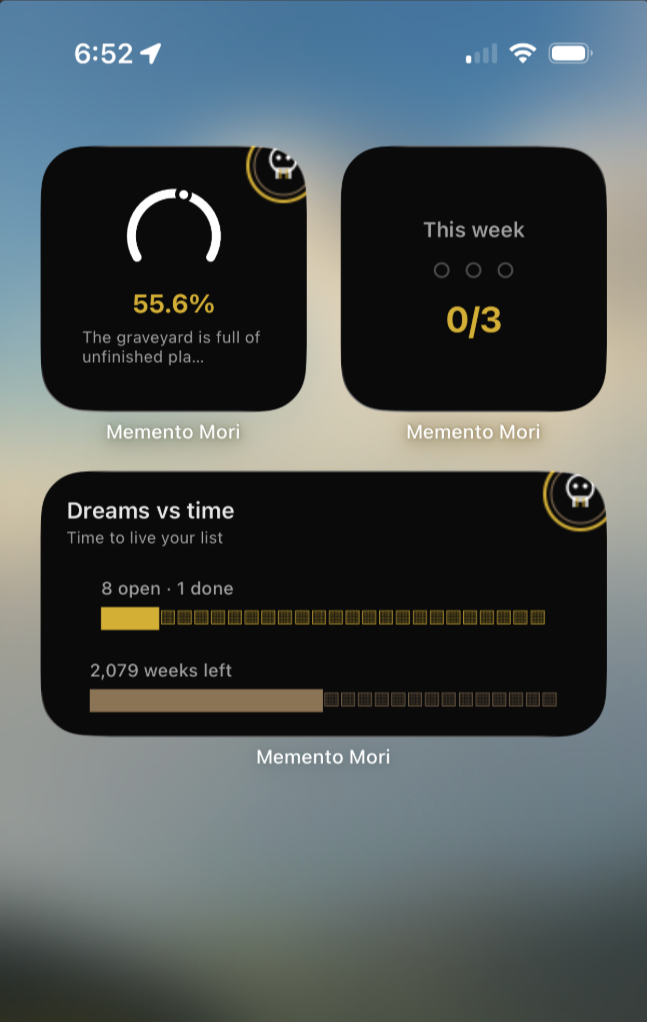
Memento Mori home-screen widgets — polished readable set

Metric Trend Overlays for SharePoint Scorecards

· One min read
Mike Homol
Principal Consultant @ ThreeWill

Measurable trends on the Human Services Scorecard work better as a dedicated overlay and picker flow than as charts crammed into every KPI tile. This is the strong opening chapter — more is coming, including a public release.

What happened​

  • Added a metric trend overlay, trend service, and metric picker UX on the timeline
  • Gave trends their own surface instead of overloading tile layout
  • Continues the Scorecard UX thread from earlier metric ordering / group-by / owner work
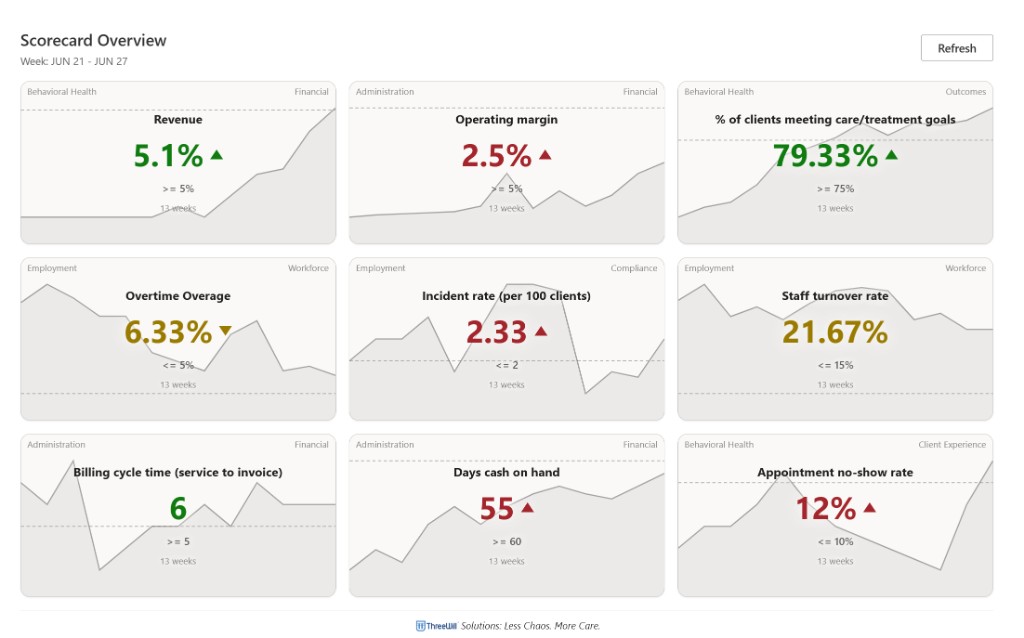
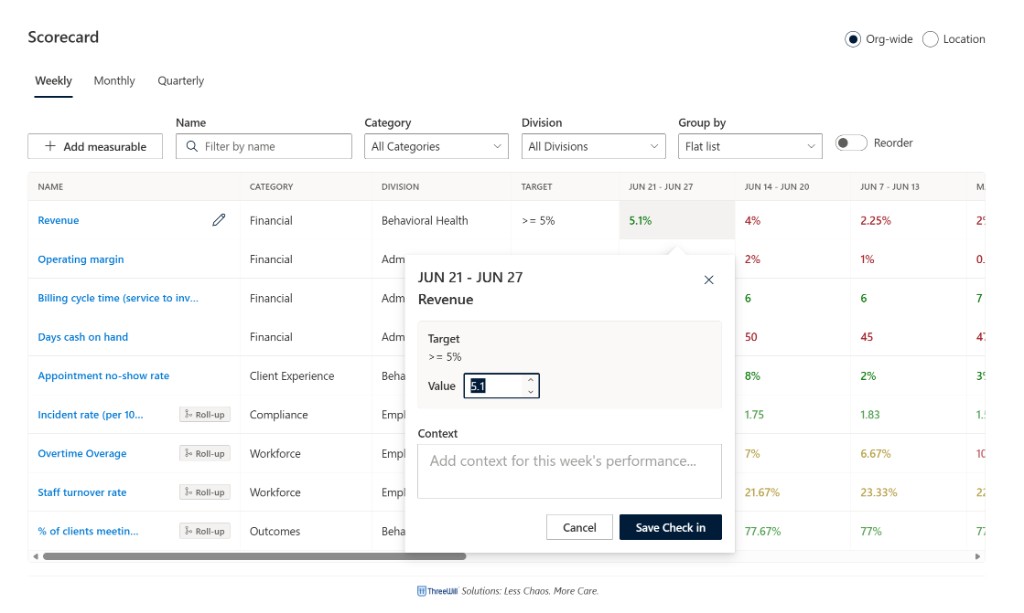
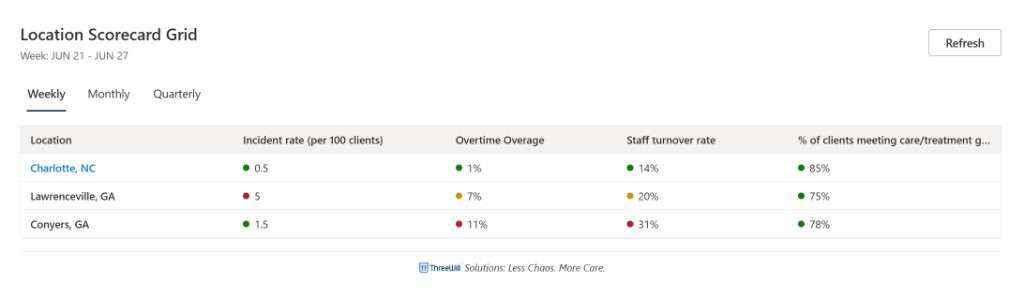
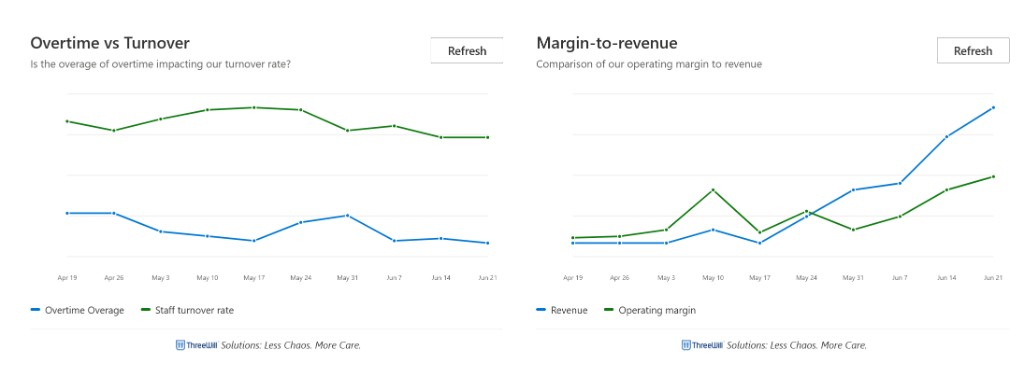
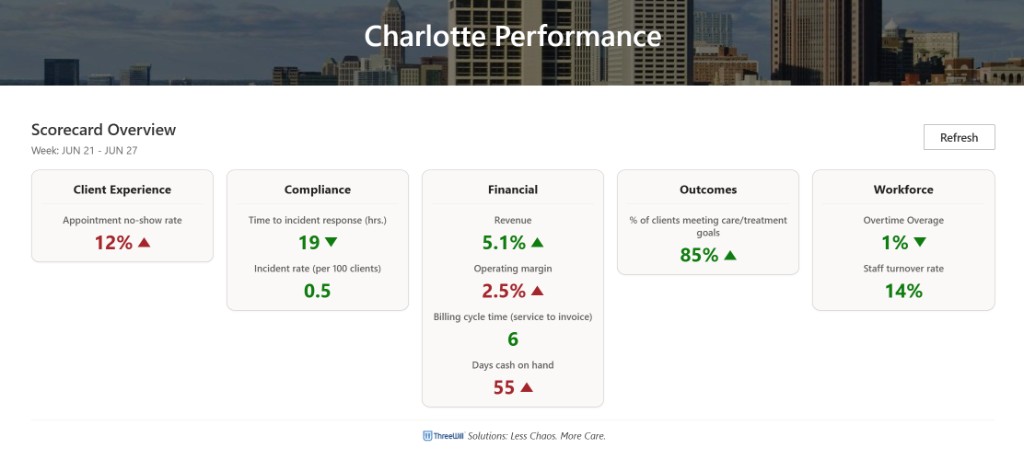
  • Confirmed merged/deployed on the intended demo surface — Overview tiles with sparkline trends, weekly check-in grid, location grid, comparison charts, and location performance views
  • Framing for the public story: start strong here, then ship follow-ups as the product and packaging mature toward a public release

Scorecard Overview with sparkline trends on KPI tiles

Scorecard weekly grid with check-in dialog

Location Scorecard Grid across sites

Comparison charts — overtime vs turnover and margin-to-revenue

Charlotte Performance location Scorecard Overview

Weekly AI Builds - July 13, 2026

· One min read
Mike Homol
Principal Consultant @ ThreeWill

Widgets got clearer, Backseat Games got a delight pass and Solo Mode, and Managed Services tooling kept moving — with public-safe notes on a client Dataverse hygiene win.

Highlights​

  • Polished Memento Mori widgets (brand skulls, trimmed set) verified on device / TestFlight; App Store v1 docs will cover the full polished layout set.
  • Shipped Backseat Games v1.1 delight + Solo Mode — update is live on the App Store with the new Travel Bingo and License Plate visuals.
  • Hardened prospect phone matching and duplicate-merge reporting on a client Power Platform / Dataverse engagement (kept generic).
  • Scorecard trend overlays and related web parts continue a strong shelf story — more posts ahead, including a public release.

Learn More​

Open-Sourcing Advanced Page Properties After an SPFx 1.23 / Heft Migration

· One min read
Mike Homol
Principal Consultant @ ThreeWill

Advanced Page Properties started years ago as a PnP-style experiment and kept maturing. This week’s window finally pushed the SPFx 1.23 / Heft migration over the line and packaged the repo for an MIT public release.

What happened​

  • Migrated the solution to SharePoint Framework 1.23 with the Heft toolchain and PnPjs v4
  • Synced lockfiles and CI for legacy-peer-deps realities of modern SPFx
  • Added LICENSE, CONTRIBUTING, SECURITY, and deployment validation docs
  • Promoted the public repo on the Homol Works Builds page — verified against the public GitHub release
  • Public write-up stays fork-agnostic: no client-specific or niche tenant branches called out
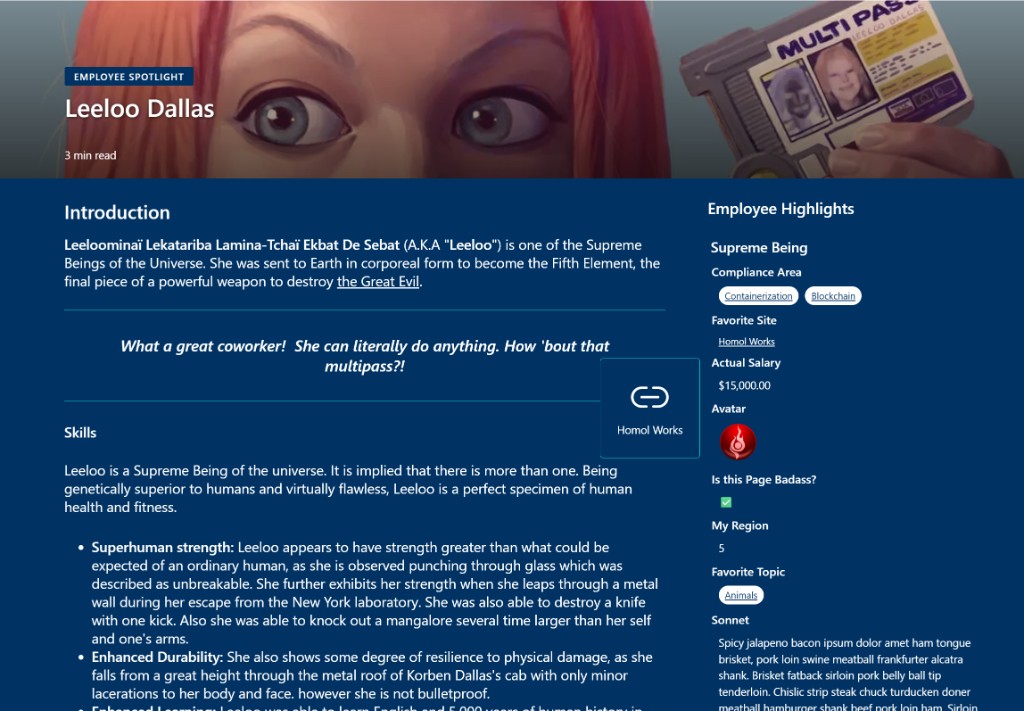
  • Demo screenshot of an Employee Spotlight page showing page properties in action (choice pills, links, currency, avatar, boolean, number, and long text)

Advanced Page Properties on an Employee Spotlight demo page

Reviving iOS Widgets on Expo SDK 55 (and Why They Went Black)

· One min read
Mike Homol
Principal Consultant @ ThreeWill

Home-screen widgets for Memento Mori came back to life on Expo SDK 55 — but not before a stretch of black squares that looked like a React layout bug and were actually an extension packaging problem.

What happened​

  • Rebuilt widgets against Expo SDK 55 with expo-widgets patches and EAS multi-target signing
  • Black widgets traced to JS bundle copy into ExpoWidgetsTarget.appex, postinstall idempotency, and extension runtime symbols
  • Hardened TestFlight / IPA CI gates so widget regressions fail earlier
  • Current home-screen set is readable again — life % ring, weekly check-ins, and Dreams vs time — after the black-widget era
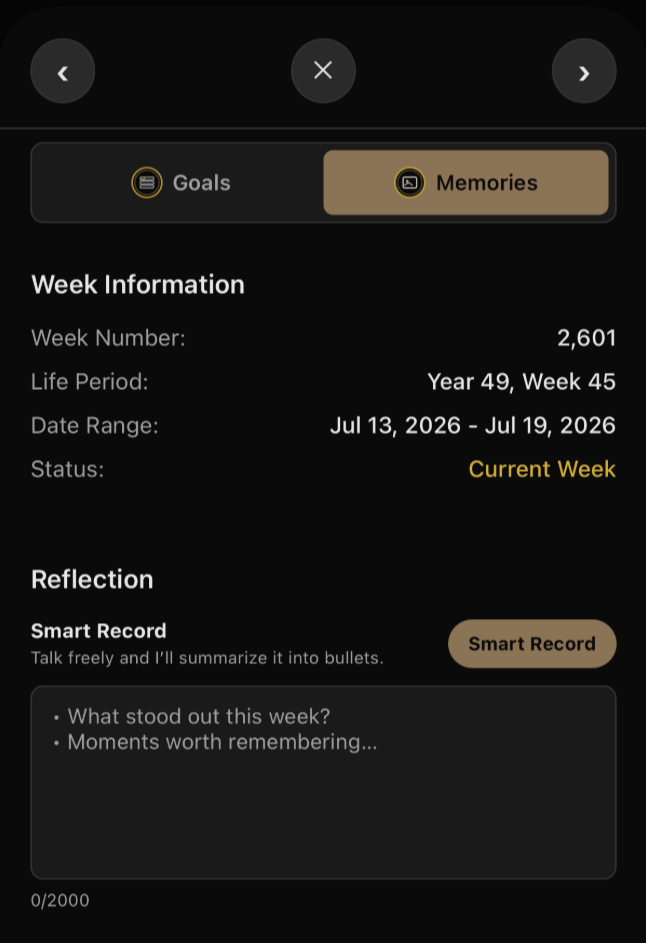
  • Smart Record is active again (not gated off for release): speak stream-of-consciousness reflections and get a bulleted summary; in final testing ahead of app go-live

Memento Mori home-screen widgets after the Expo SDK 55 fix

Smart Record — talk freely, get a bulleted reflection summary

Ruddr MCP v0.3.0 — What Shipped in the First Public Release

· One min read
Mike Homol
Principal Consultant @ ThreeWill

Ruddr MCP Server left the internal toolbox and landed as a public ThreeWill release — a self-hosted stdio MCP that puts PSA data into Cursor and Claude Desktop.

What happened​

  • Prepared and tagged public release v0.3.0 — confirmed against the Homol Works Builds page listing
  • README, changelog, and security policy updates for an external audience
  • Public write-up direction: install-first — help people who want a test drive get the release zip wired into Cursor (not just a tool-surface tour)
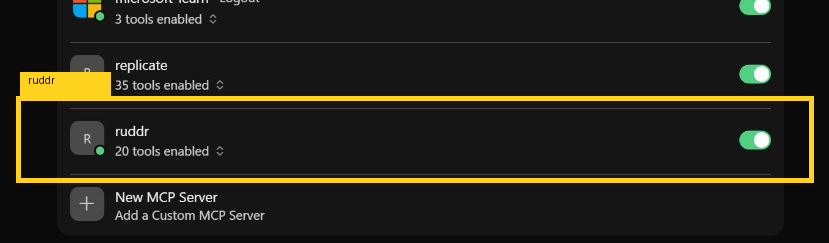
  • Showing up in Cursor as an enabled Home MCP server (ruddr, 20 tools) once configured

Ruddr highlighted in Cursor Home MCP Servers

Weekly AI Builds - July 8, 2026

· One min read
Mike Homol
Principal Consultant @ ThreeWill

A packed week across personal apps, Homol Works comeback work, and open-source releases — including the first public cuts of Ruddr MCP and Advanced Page Properties.

Highlights​

  • Revived Memento Mori home-screen widgets on Expo SDK 55; Smart Record is active again and in final testing before app go-live.
  • Brought Homol Works back online with a terminal theme, gopher logo, Builds page, and weekly AI-build drafts.
  • Cleared an App Store blocker for Backseat Games, open-sourced Advanced Page Properties (SPFx 1.23) with a demo spotlight shot, and tagged Ruddr MCP v0.3.0 with an install-first public write-up plan.
  • Advanced Managed Services shelf work: Scorecard metrics UX, MS Pulse packaging, and a DDS Referrals demo-reset pipeline.

Learn More​

Transmission Resumed — A Year Inside Cursor

· 12 min read
Mike Homol
Principal Consultant @ ThreeWill

STATUS: SIGNAL REACQUIRED · HOMOL WORKS ONLINE · OPERATOR: MIKE HOMOL

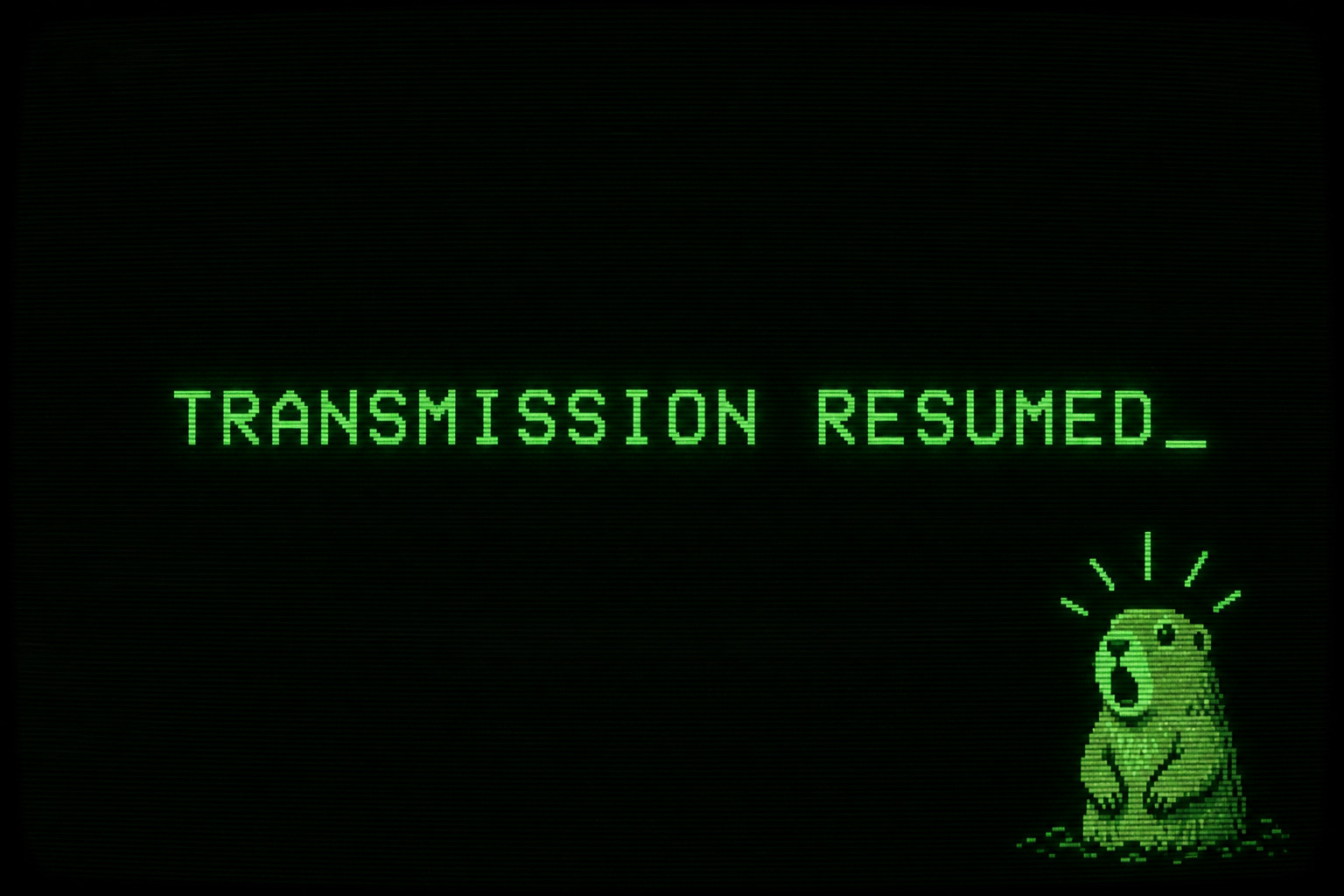
Transmission resumed — AI-generated hero image, human reviewed

If you have been here before, the gap is obvious.

My last post on this site was Consult the Oracle in early 2023 — me staring at ChatGPT like it was the promised evolution of artificial intelligence, already wondering what it would do to coding, writing, and the shape of "thinking jobs." Then life got loud, client work stayed loud, and Homol Works went quiet.

The builder did not stop. The blog just did.

This is the transmission coming back online — and the honest recap of what the past year has looked like once Cursor became less of a novelty and more of how I actually work.

Consult the Oracle - the seismic shift of ChatGPT

· 4 min read
Mike Homol
Principal Consultant @ ThreeWill

The future has arrived in the form of ChatGPT.

Consult the Oracle

So I'm late to the party on ChatGPT. Doesn't matter. I have to write about it, as it's just too groundbreaking to not.

I returned from break to find my coworker talking up ChatGPT. I had heard a few things already but folks had just referred to it as a chat bot. Umm, it's so much more. Once my buddy showed me the blog post it rendered when he gave it a simple topic suggestion and then the PowerShell script it created based on the idea he fed it, I realized I was looking at something far more than a chat bot. This was the promised evolution of Artificial Intelligence.

Like any other good coder, I started tinkering around and haven't stopped thinking about what I could or should be doing with this technology.

Here are my initial predictions and thoughts on how this will impact us and the world.

Always start with it​

Basically, anytime you have something to do: research, guidance, recommendations, starting a coding solution, planning, scripting, you name it. Check ChatGPT first. Use it as something to do a baseline against, if nothing else. You should see your productivity go up and I won't be surprised if companies start to expect that as well.

Scaffold your code with it​

If you have a product or idea for a program or app or coded solution, use this to get it scaffolded. It's not yet at a place where it can make complex solutions based on a multitude of feature inputs, but you could definitely ge there just by communicating with ChatGPT in chunks. The code may not be functional or perfect, but I can guarantee you will have something to start with much faster than anything else you've ever used. Plus, starting out something can feel tedious and repetitive and this just expedites it even more.

"Thinking" jobs are going to shrink, eventually​

Is this a future that scares me a bit? Yes. We always associated robots with replacing manual labor but this is the moment I'm understanding that even the thinking jobs, like coding, writing, imagining, engineering could also be replaced. If nothing else, you'll need fewer and fewer people with the idea and the means and the code monkeys and designers can be replaced entirely. Andrew Yang's UBI is sounding more and more appealing. In all seriousness, as a father of 4, I worry about a world in which fewer and fewer people are needed to get things done, as it could allow for an even further divide in our already divided class system. In a world where people may be needed to "do" things less and less, I may be encouraging my children to get back to the basics and be sure that they are self-sufficient and capable of doing the jobs no one wants to do. It may be all that's left at the end - or get a job with SpaceX and hop of this rock lol.

I knew that Neuralink would be something special, but now I feel like I can conceptualize it even for myself. I find myself wanting to treat ChatGPT as an extension of my own consciousness, even though it's working independently. Once I have fed it something and received information back, I can't unlearn it, so it becomes a part of me. I feel like this will be the outcome of a Neuralink that is paired with this type of underlying technology, at instantaneous speeds and interfacing directly with the brain. Kind of mind-boggling really.

That's my first impression of this groundbreaking technology. It is truly game-changing. It's our modern Oracle.

Why should my organization care about power platform adoption?

· 5 min read
Mike Homol
Principal Consultant @ ThreeWill

On your digital employee experience journey with Microsoft and the 365 ecosystem, you're going to encounter an opportunity to adopt the Power Platform and grow its use within your organization. Should you jump at this chance?

Part of the Journey​

In our world of hybrid work, it is a necessity for your organization to embark on a digital employee experience journey. You want your physical workplace to have all of the necessities and process in place so your people can both "get their work done" but also thrive within your organization. Your digital workplace needs to do the same.

As your organization and your people mature, hopefully they will find new and exciting ways to contribute and innovate. If you've chosen Microsoft 365 as the basis for your digital workplace and employee experience, then you will inevitably encounter the Power Platform. When this moment comes, you will be faced with a choice: to embrace or ignore.

Who does this benefit and how?​

This decision to adopt Power Platform can be seen through many different lenses, but I want to focus on these 3 key beneficiaries:

  • Me
  • My Team
  • The Organization

As we look at these beneficiaries, I will break it down into 2 ways we can measure the success of adoption:

  • The innovation or improvement it can provide
  • The ROI it might provide

How will it benefit me?​

In this case, we are talking about the individual or citizen developer: your people.

Innovation/Improvement​

Replace repetitive tasks with flows or apps to improve my focus on what really matters

Quantitative ROI​

Time saved per day vs Time spent to make a flow or app

How will it benefit my team?​

Here we are looking at the leader or decision maker of a team or group or department/division.

Innovation/Improvement​

Replace regular, and potentially involved, manual business operations with a flow or app to create new efficiencies and potential to focus on brand new opportunities and ideas

Quantitative ROI​

Time saved in a year vs Time spent to make solution

How does this benefit the organization?​

Here we want to look at the benefits as perceived from the "C suite" perspective, assuming the previous 2 barriers have been surpassed.

Innovation/Improvement​

Replacing all of these various manual and/or outdated tasks creates space for new innovations and new ideas

Quantitative ROI​

Either cutting costs or improving efficiencies and creating new opportunities for growth

Are these benefits real?​

So there can be benefits seen all the way up through the organization. But are these benefits real? I certainly think so and here at ThreeWill we have seen this evidence at all stages. But what does Microsoft have to say about it? They have studied it enough to be able to put their learnings into a Power Platform ROI Calculator. According to them, the return-on-investment calculator is an interactive model based on The Total Economic Impact™ of Microsoft Power Platform, a commissioned study conducted by Forrester Consulting. As you dig in, you'll see that this is something that has been analyzed deeply and these benefits aren't just "pie in the sky". These have real dollars associated to them and we know that innovation can sometime be priceless.

You should take the time to review the entirety of the study and what was found, but I want to point out just the quantified benefits:

  • Citizen developer projects completed using low-code/no-code tools cost less.
  • The organizations replaced third-party business applications and business intelligence tools with Power Platform.
  • Solutions built with Power Platform made users of all types more efficient.
  • Power Platform delivered improved business outcomes across many dimensions.

Where to start?​

When getting started with Power Platform, you may be inclined to just "turn it off" for now. Here's what I would say on the matter: your instinct is not wrong, but perhaps it doesn't need to be that drastic. Here's the reality: Microsoft has made the citizen developer their #1 priority and if that creates more hassle for IT, so be it. Thankfully, there are some things that can be done early and quickly so that you don't have to throw out the baby with the bathwater.

Now there is more than just one thing you can do to get started and I have plenty to say on the matter. Additionally, I'd be remiss if I didn't recommend talking to ThreeWill first to make sure you get started in the right way. But here's my first clue for you, if you truly are just getting started with the Power Platform and feel like adoption is something you want: Visibility.

Governance without Analytics is just your opinion​

Remember that you can't govern what you can't see. And if you can't govern or monitor it, how will you help people grow with it? So your first order of business will be to set yourself up for success with better visibility and a process that can respond and work with this new level of insight. This will allow you to feel empowered to open the flood gates. This is a service offering at ThreeWill: a Power Platform governance workshop, where we will work with you to help setup a Microsoft Center of Excellence and the implied necessary process, along with a step-by-step road map of next steps for success.

The following was a cross-post from ThreeWill