Operational Dashboard for the Human Services Scorecard

· 2 min read
Mike Homol
Principal Consultant @ ThreeWill

Scorecard tiles are great for a check-in moment. Operators still need a full-page place to see what needs attention across communities, compare locations, and read trends without hopping web parts. This week I shipped that shell for the Human Services Scorecard — and tightened the metric math that feeds it.

What happened​

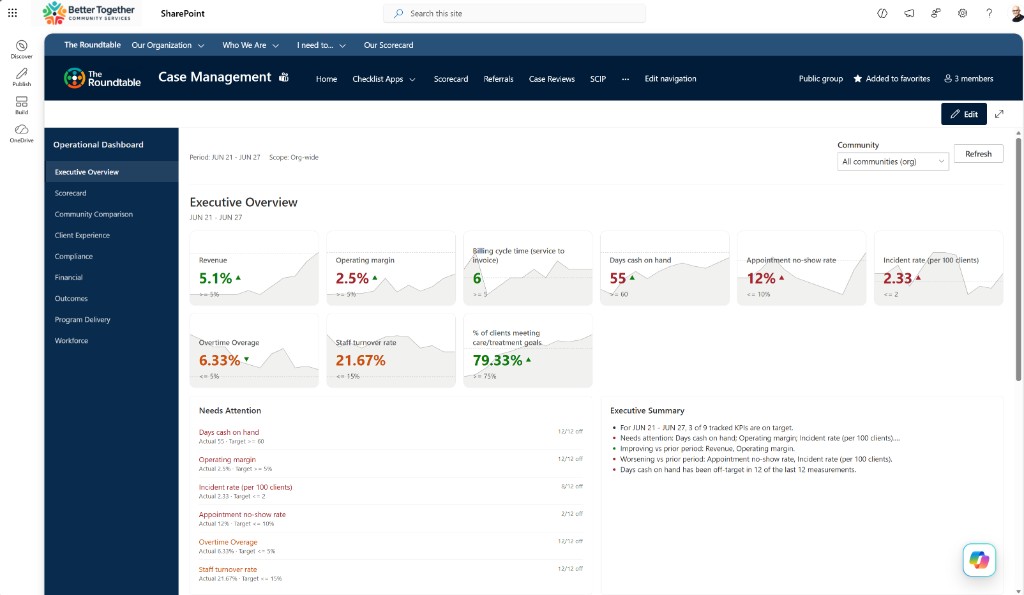
  • Added a new Operational Dashboard SPFx web part with a full-page shell: Attention panel, Summary panel, community comparison, KPI strip, trend chart destinations, and shell nav/context
  • Added weighted rollups and per-location goal overrides for Sum metrics so “All communities” views stop lying about local targets
  • Surfaced location Needs Attention on category pages when viewing All communities
  • Colored week-over-week trend arrows by target favorability (lower-is-better down = good) instead of raw up/down
  • This is the next chapter for both the Human Services Scorecard and ThreeWill as a business: HSS is the spine for displaying metrics that matter to human services organizations — especially Senior Living — while we work toward automated integration with the back-end systems that bring those dashboards to life (Financial, CRM, HR, and EHR apps/services)

Human Services Scorecard Operational Dashboard — Executive Overview on the demo site

Weekly AI Builds - August 10, 2026

· One min read
Mike Homol
Principal Consultant @ ThreeWill

Shelf week for the Human Services Scorecard: I shipped a full Operational Dashboard shell — Attention, Summary, and favorability-aware trends — as the next chapter in how ThreeWill surfaces metrics that matter for human services and Senior Living.

Highlights​

  • Built a new Human Services Scorecard Operational Dashboard SPFx shell — Attention + Summary panels, community comparison, KPI strip, trend destinations, weighted Sum rollups, per-location goal overrides, and WoW arrows colored by target favorability.
  • Positioned HSS as the display spine for metrics that matter, with a path toward automated Financial / CRM / HR / EHR integrations that bring those dashboards to life for Senior Living and other human services orgs.
  • Continued side work without separate Learn More posts: Memento Mori iOS 26 PNG freeze fix, Backseat Games Android solo-launch packaging, state licensing monorepo/ADO hardening, and a small knowledge-base hygiene script.

Learn More​

From Discovery Notes to an ADO Import Pack

· 4 min read
Mike Homol
Principal Consultant @ ThreeWill

Discovery backlogs often die as sprawling spreadsheets. This week I turned a kickoff architecture, an estimating sheet, and a gap analysis into an Azure DevOps import pack — so a multi-app modernization engagement can load phased work items instead of debating a static file.

What happened​

Planned architecture (discussion-grade)​

Married the system design with the Azure architecture into a living trajectory the team can share:

  • API-first, location-driven platform — one Azure SQL system of record, document binaries in Azure Blob (SQL keeps metadata / blob_uri), shared .NET API behind API Management
  • Three clients, one API — internal React SPA, offline-capable field app (.NET MAUI + SQLite sync), and an external React portal (Entra External ID + accessibility expectations)
  • Scriptable Azure baseline — PowerShell orchestrating Azure CLI against a JSON resource manifest (Key Vault, App Insights, SQL, App Service, Functions, Static Web Apps stubs, Communication Services) in a single primary resource group
  • Auth split — Entra ID for internal users; Entra External ID for portal users
  • Integrations later in the sequence — payments, HR feed, insurer file drop, addressing, notifications — after core domain and apps stand up
  • Migration + hardening as late phases — cutover from the legacy permitting platform, then security/docs/go-live

Nothing here claims a finished production tenant; it is the kickoff architecture the backlog is sequenced against.

Delivery phases​

Sequencing is P0–P10 (~16-month build). Phases are delivery order labels — not ADO Epics:

CodePhaseIntent
P0Discovery & UX/data designRequirements depth, mocks, SQL + Blob layout
P1Azure platform & IaCScriptable baseline resources
P2Data model & API coreLocation-first anchors, OpenAPI, auth
P3Main app shellInternal React Static Web App framework
P4Domain capabilitiesLicensing, plan review, inspections, complaints, fiscal
P5Field / inspectors appOffline MAUI + sync
P6External portalPublic React + External ID
P7IntegrationsPayments, HR, file drops, notifications, addressing
P8MigrationLegacy platform → new system
P9Reporting & BIAnalytics (decision pending)
P10Hardening & cutoverSecurity, runbooks, go-live

From estimate sheet to picklist​

Started from the original estimating backlog (archived workbook — not reproduced in detail here). Ran a gap analysis against the architecture so platform, IaC, auth, observability, and other design-driven work that never appeared as estimating line items still landed as stories.

Final picklist: 238 user stories — 214 from the estimating backlog and 24 gap stories.

How Azure DevOps sees it​

Hierarchy is Epic → Feature → User Story under one existing endeavor Epic (client project names stay private):

  • Features = durable solution layers (Infrastructure, API, Internal SPA, External SPA, MAUI, Integrations, Migration, Reporting, Program & delivery, …) — not one Feature per phase
  • Tags = delivery sequence (Phase-P0 … Phase-P10), layer markers, which app slice owns the story, and Source-Backlog vs Source-Gap
  • A generator script regenerates the CSV pack when discovery notes change; the import is a single hierarchical CSV for Boards → Import Work Items

Obfuscated picklist sample​

A thin slice of Infrastructure / early-platform stories (titles lightly generalized; tags show the real shape):

Feature | User Story | Tags (abbrev.)
Infrastructure | Set up technical work environments (Azure, DevOps, …) | Phase-P1; Layer-Infrastructure; Source-Backlog
Infrastructure | Scaffold PowerShell + Azure CLI + JSON resource manifest| Phase-P1; Layer-Infrastructure; Source-Gap
Infrastructure | Provision Key Vault and wire secret references | Phase-P1; Layer-Infrastructure; Source-Gap
Infrastructure | Provision Application Insights / Monitor baseline | Phase-P1; Layer-Infrastructure; Source-Gap
Infrastructure | Configure Entra ID for internal app + API | Phase-P1; Layer-Infrastructure; Source-Gap
Infrastructure | Configure Entra External ID for portal users | Phase-P1; Layer-Infrastructure; Source-Gap
Infrastructure | Provision Azure SQL (dev) via IaC scripts | Phase-P1; Layer-Infrastructure; Source-Gap
Infrastructure | Provision APIM + App Service for .NET API | Phase-P1; Layer-Infrastructure; Source-Gap
Infrastructure | Provision Static Web Apps stubs (main + portal) | Phase-P1; Layer-Infrastructure; Source-Gap
Infrastructure | Add GitHub Actions CI skeleton for API and web apps | Phase-P1; Layer-Infrastructure; Source-Gap

Gap items (like the IaC scaffold row) are the architecture calling things the estimate sheet never named — exactly why the gap pass matters before import.

Weekly AI Builds - August 3, 2026

· One min read
Mike Homol
Principal Consultant @ ThreeWill

Follow-through week on a state licensing modernization kickoff: I married the architecture and estimating sheet into phased delivery docs, ran a gap analysis, and packaged 238 user stories as an Azure DevOps import pack.

Highlights​

  • Built an ADO backlog import pack from architecture + estimating: living solution phases (P0–P10), a gap-aware picklist (214 backlog + 24 gap stories), hierarchical CSV under one endeavor Epic, and a generator script — Features as solution layers, tags for phase/app/source.
  • Kept client project names, endeavor titles, and org paths out of the public write-up while preserving the real shape of the import (Epic → Feature → User Story).
  • Continued adjacent engagement and product work (architecture trajectory docs; Scorecard SPFx polish) without separate Learn More deep-dives this week.

Learn More​

Bootstrapping an Enterprise Repo with Engineering Standards

· 2 min read
Mike Homol
Principal Consultant @ ThreeWill

Starting a new enterprise engagement is more than scaffolding code — agents and humans need shared delivery rules from commit one. This week I wired a new delivery repo with ThreeWill Engineering Standards as a git submodule and product-specific agent context before the first feature branch landed.

What happened​

  • Added threewill-engineering-standards as a git submodule at .cursor/rules/ so team non-negotiables, MCP docs, and SPFx patterns travel with the repo
  • The standards package is the result of a long partnership and rounds of planning with Cursor — so every developer, whether working locally or in the cloud, can trust that agents follow the same rules
  • The approach predates Cursor Cloud agents, but it remains a strong way to distribute consistent agentic behavior; it is still a work in progress, and the team is happy with how far it has come
  • Wrote product-specific AGENTS.md with submodule hygiene: detect missing standards, init/sync commands, and a light cadence for bumping the pinned SHA via PR
  • Documented delivery conventions in docs/delivery.md: branch + PR discipline, Azure DevOps Boards ↔ GitHub PR linkage (AB#<id>), GitHub Actions CI/CD posture, and Azure DevOps MCP setup for Cursor — without publishing client org or cutover details
  • Added Cursor Cloud-specific instructions so cloud agents follow the same submodule and delivery rules as local sessions
  • Adoption across the practice keeps improving — especially on SPFx web parts, where the standards enforce fewer rules but bring a consistent look-and-feel and reusable React components
  • Recent advancements clarify sophistication levels: Enterprise solutions carry a fuller requirements set than smaller/atomic solutions, so agents and humans get the right bar for the work
  • The same submodule pattern shows up across multiple active delivery repos (enterprise engagements and internal SPFx products), not only this kickoff

Weekly AI Builds - July 27, 2026

· One min read
Mike Homol
Principal Consultant @ ThreeWill

Kickoff week for a state licensing, permits, and inspections modernization: I bootstrapped the delivery repo with ThreeWill Engineering Standards so local and cloud agents share the same rules from day one — then used Cursor on discovery artifacts for a discussion-grade data model.

Highlights​

  • Bootstrapped a new enterprise delivery repo with the threewill-engineering-standards submodule, product-specific AGENTS.md (submodule hygiene, branch + PR, Azure DevOps work-item linkage, ADO MCP), and Cursor Cloud agent instructions — standards that predate Cloud agents but still distribute consistent agentic behavior.
  • Noted practice-wide adoption improving, especially on SPFx work (lighter rule surface, shared look-and-feel and React components), plus clearer Enterprise vs smaller/atomic sophistication levels with different requirements.
  • Ran an AI-assisted discovery pass over stakeholder transcripts and legacy UI reference screenshots toward a kickoff data model (draft), including a location-first refinement with the team.

Learn More​

Backseat Games v1.2 — Free Solo Mode and a Clearer Monetization Line

· One min read
Mike Homol
Principal Consultant @ ThreeWill

Solo Mode was the reliability win from v1.1 — this week I made it free and moved the one-time purchase behind Play online, so families can try the app offline before deciding to host a multiplayer session.

What happened​

  • Bumped to v1.2.0 on TestFlight with Solo Mode free and IAP gated behind Play online
  • Confirmed App Store / support pricing copy matches that line: joining and Solo stay free; the one-time host unlock sits behind Play online
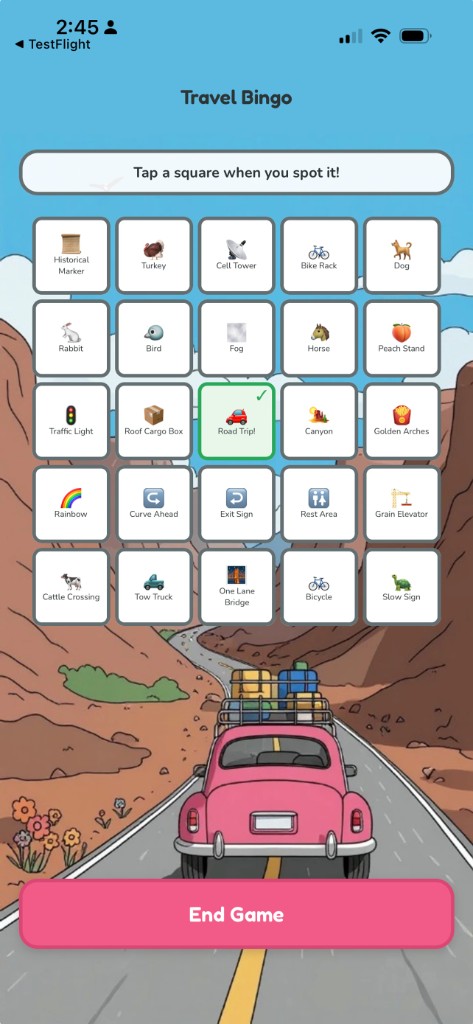
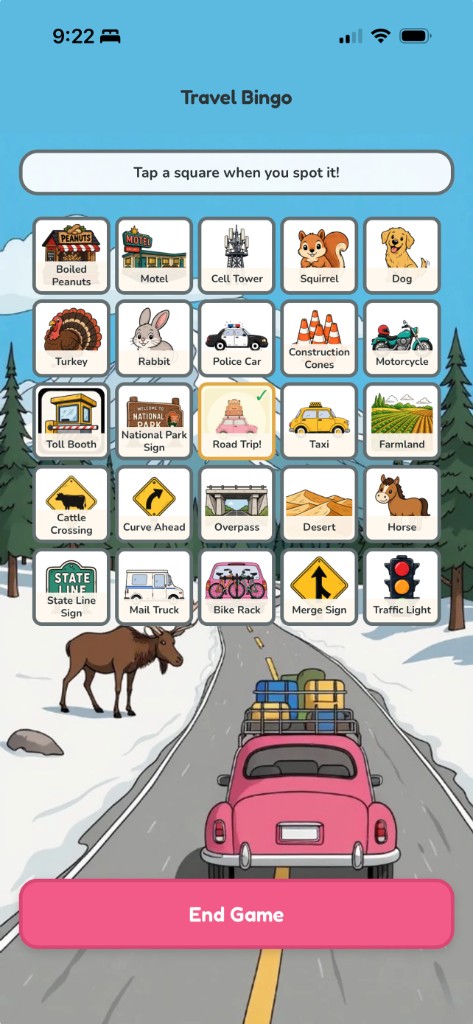
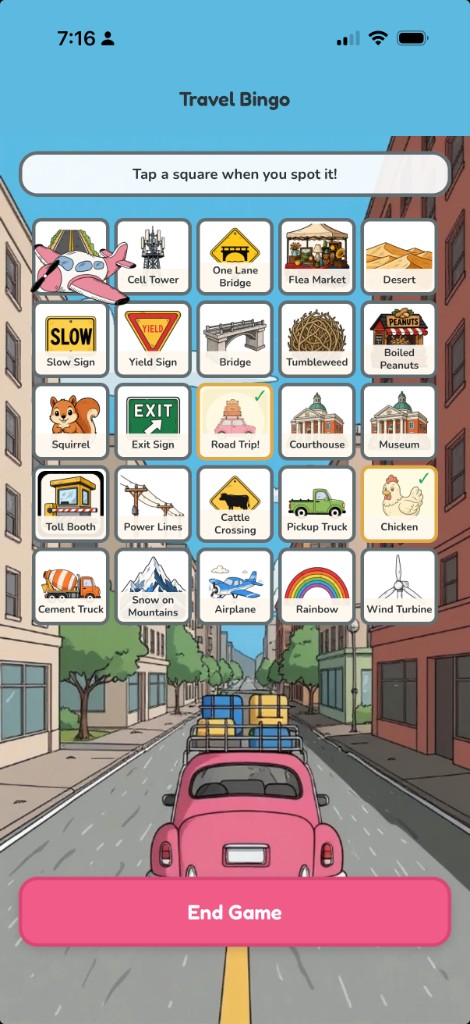
  • Finished Travel Bingo per-item art across landmarks, businesses, scenery, vehicles, signs, and animals — generated icons and refreshed state plate art
  • Travel Bingo tiles moved from small stock emojis to custom illustrated sprites (same board, much clearer at a glance in the car)
  • Added plane propeller spin overlays and accessibility fixes; logged new game ideas in the backlog
  • Published Backseat Games marketing, privacy, and support pages on Homol Works (App Store URL, hero, and game lineup)
  • Refreshed the marketing hero and on-site game descriptions to match the current three-game lineup

Travel Bingo with custom sprites — canyon road background

Travel Bingo with custom sprites — snowy road background

Memento Mori App Store Prep — Skia Calendar, Brand Coin Widgets, and the Homol Works Hub

· 2 min read
Mike Homol
Principal Consultant @ ThreeWill

After last week's widget readability pass, the focus shifted to submission readiness: a Skia life calendar, a consistent brand coin across widgets and loading states, deep-linked home widgets, and the marketing/privacy/support URLs App Store Connect expects.

What happened​

  • Rebuilt the life calendar on Skia — better scroll and zoom for a 4,680-week grid, with the tradeoff of a heavier Skia dependency and canvas-style rendering to maintain instead of a pure View-based layout
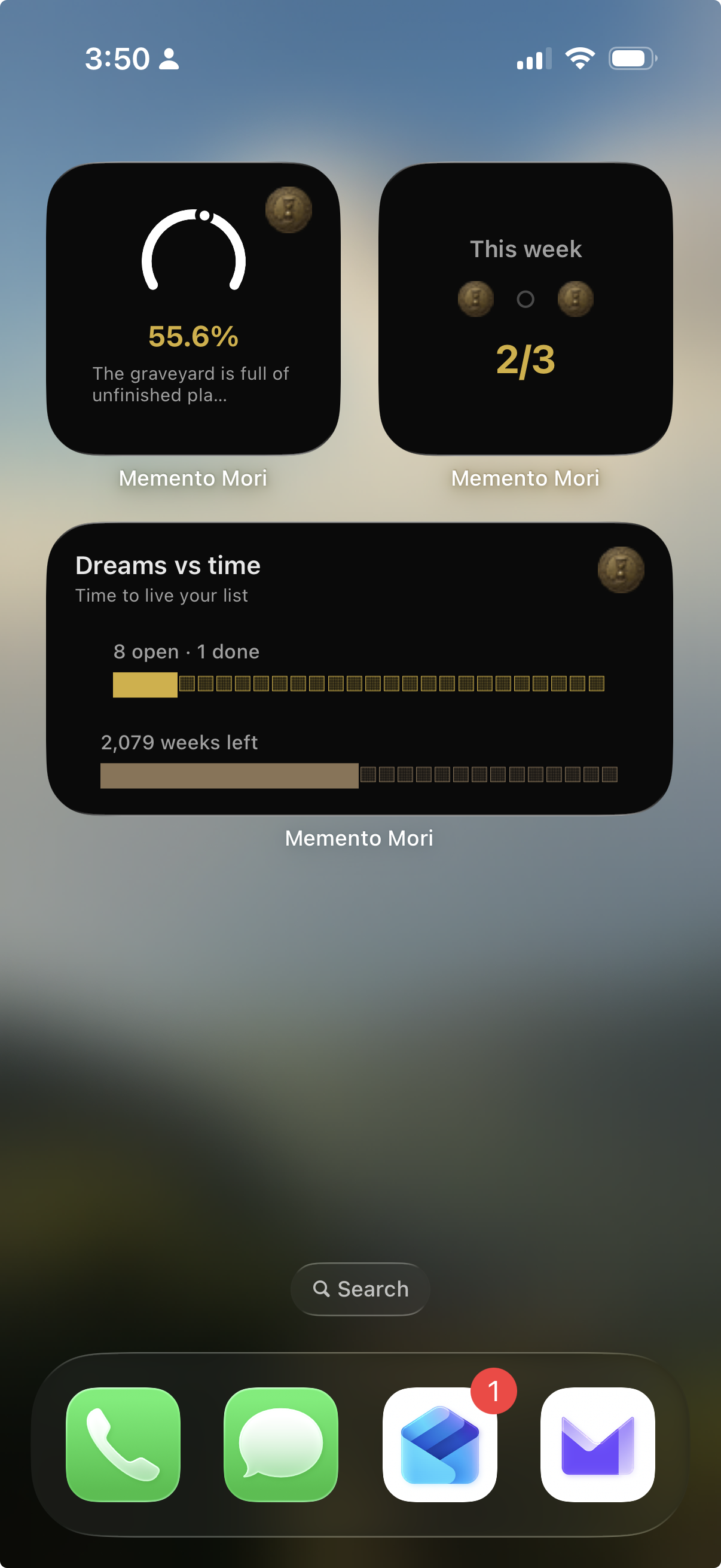
  • Enriched home-screen widgets (Dreams vs Time, Life Ring, Week Gauge) and replaced skull cutouts with a shared brand coin asset — extract script, CoinSpinner in-app, and widget snapshot wiring
  • Dropped the clipped goals widget; home widgets now deep-link into the right in-app tabs and use the coin as the weekly goal completion marker
  • Hardened Smart Record AI with clearer error messages, reflection editor improvements, and fallback merge tests
  • Locked the iOS build to iPhone-only and added an App Store screenshot / preview prep workflow
  • Finalized the App Store screenshot set on Homol Works and an App Preview video for Connect
  • Published a Memento Mori app hub on Homol Works with marketing copy and those same screenshots

Memento Mori Home Screen widgets with brand-coin goal markers

Weekly AI Builds - July 20, 2026

· 2 min read
Mike Homol
Principal Consultant @ ThreeWill

App Store prep week: Memento Mori got a Skia life calendar, brand-coin widgets, and Homol Works hub pages; Backseat Games shifted monetization for Solo Mode and finished Travel Bingo sprite art.

Highlights​

  • Rebuilt Memento Mori's life calendar on Skia, unified the brand coin across widgets and in-app loading (including coin markers on weekly goals), deep-linked home widgets to tabs, and locked the build to iPhone-only for App Store submission — with screenshot prep, an App Preview video, and a new Homol Works app hub.
  • Shipped Backseat Games v1.2 to TestFlight: Solo Mode is free, IAP sits behind Play online, Travel Bingo tiles moved from stock emojis to custom sprites, and marketing/privacy/support pages landed on Homol Works.
  • Refreshed the ThreeWilly managed-services weekly canvas and hardened work-item autonumber / Teams draft signals.

Learn More​

Solo Mode — Offline Play Without a Multiplayer Lobby

· One min read
Mike Homol
Principal Consultant @ ThreeWill

Backseat Games got a v1.1 delight pass — and Solo Mode so play still works when the relay lobby cannot. Offline-first turned out to be a product feature, not a fallback.

What happened​

  • Shipped jingle, SFX, icons, critter motion, and first-run teaching as one release theme
  • Added Solo Mode for offline play without a relay lobby
  • Useful for App Store demos and real car rides with spotty connectivity
  • Update is live on the App Store — Solo Mode and delight assets look right on device
  • Visual polish landed across the games (Travel Bingo board + License Plate Game cards)

Backseat Games Travel Bingo with delight visuals

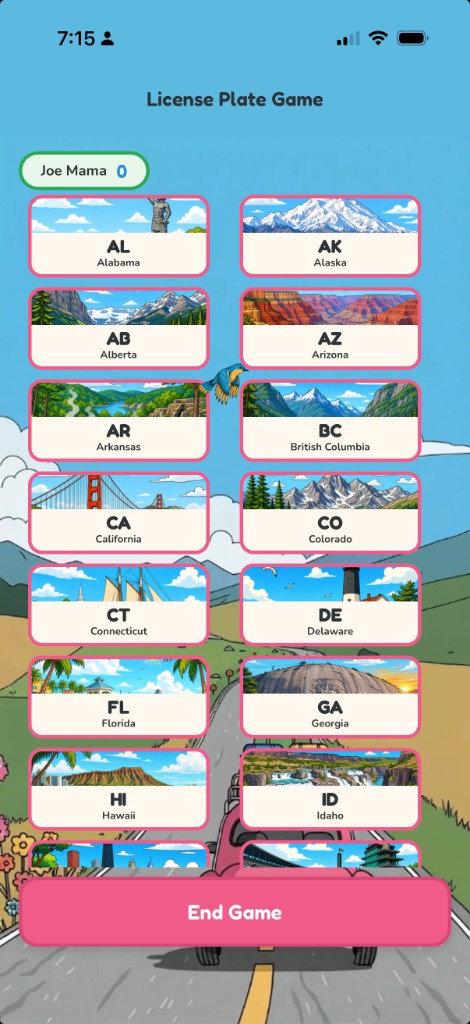
Backseat Games License Plate Game card grid