From a Local Claude Code QBR to a Copilot-Ready Azure Function

A manufacturing client already had a working Customer QBR generator. It lived in Claude Code: a Python script, a handful of Excel extracts, and a self-contained HTML dashboard that sales could actually present. The ask was not “make Copilot write a nicer report.” It was “let sales ask Copilot for the same dashboard, for any customer, without running a laptop script.”
That sounds like a prompt problem. It was an architecture problem.
The local solution was already good
Someone on the client side had used Claude Code to build a deterministic pipeline, not a chatty summarizer. The script read four monthly Excel workbooks (orders, returns, forecast, item/customer master), computed a pile of KPIs, and injected the results into an HTML template. The output was an interactive canvas: YTD sales, units, on-time delivery, fill rate, forecast variance, RMAs, pipeline, recommended actions.
That is the kind of artifact consulting teams usually wish they had. Charts with real numbers. Tooltips. A predictable layout so the next quarter looks like the last quarter, just with new data.
The Excel files were not a convenience dump. They were the contract. Sheet names looked like ERP/BI view exports. The Python encoded client-specific windows and matching keys on top of that shape. If you skip the contract and ask an LLM to “read the spreadsheet and build a dashboard,” you get a different report every time — and you cannot hand it to a customer.
Phase 1 had to mimic that pipeline, not replace it. Going straight to the source system was the right end state — just not the first proof.
What Copilot cannot fake
The Copilot Studio agent had been pointed at Excel as knowledge and asked to author HTML. Two things break that design:
- Generative HTML is not the generator. The Python already owned the KPI math. An LLM rewriting dashboards from spreadsheets will drift, miss rows, and invent layout. Sales QBR is a repeatable artifact, not a one-off essay.
- Copilot Studio does not natively hand back a file. Chat can show a summary. It cannot reliably deliver a downloadable, self-contained HTML canvas unless something else produces the bytes and returns a link — Power Automate, an Agent Flow, or an external API.
The gap was wiring. Copilot should collect a customer name and return a URL. The engine should stay Python.
Wrap the engine, keep the contract
I stood up a Python 3.11 Azure Function App as an HTTP wrapper around the original generator. First data mode was Excel: the same four workbooks, staged in Blob (or a local folder for the laptop proof). The Function resolved a customer name, ran the engine, uploaded the HTML, and returned a time-limited SAS download URL.
A ThreeWill-tenant POC was enough to prove the stack before recreating it in the client’s subscription. Function-level auth (code / x-functions-key) kept the first connector simple.
| Method | Route | Role |
|---|---|---|
GET | /api/health | Liveness + which data mode is live |
GET | /api/qbr/customers | Customer name search |
POST | /api/qbr | Start generation → jobId |
GET | /api/qbr/status | Poll until downloadUrl |
Copilot Studio imported that surface as a REST API from OpenAPI. Four operations, API key in the query string, no custom connector science project.
Copilot’s 30-second wall
Generation is not a cheap lookup. After warm-up it is often 15–60 seconds; a cold run with a fat extract can take a couple of minutes. Copilot tool calls time out around 30 seconds.
So the default POST /api/qbr does not wait for HTML. It queues a Storage Queue message, returns 202 + jobId immediately, and a queue-triggered worker does the minutes-long work. A sync=true path exists for curl and smoke tests — Copilot never uses it.
Agent instructions matter as much as the API. Copilot is an orchestrator: search if the name is fuzzy, start a job, remember jobId, and on “ready?” call status with that id only. It must not author HTML, invent KPIs, or re-ask for the customer name just to poll. Hiding customerName on the status tool is what stops that re-prompt.
SAS lifetime defaults to 24 hours. The link is a download, not a forever intranet page.
Then stop copying Excel
Once Copilot could deliver the same canvas, the monthly Excel ritual became the next bottleneck. Those workbooks were already pictures of lakehouse views. Phase 2 flipped QBR_DATA_MODE from excel to fabric.
Same Function. Same OpenAPI. Same Copilot tools. Different loaders:
- Resolve the customer in the lakehouse (company name → customer key)
- Query orders, RMAs, and forecast by that key
- Take the latest forecast version
- Pull deals from the CRM table and inventory for the customer’s items
- Still load the HTML template from Blob — branding is injected at generate time
An Entra app registration in the client’s tenant, granted on the Fabric workspace/lakehouse, lets the Function use Lakehouse SQL. The Function host needs ODBC Driver 18; that is a runtime footnote, not a Copilot change.
Excel mode stayed as rollback. That mattered during the first Fabric mapping: column case, identifier quoting, and “which table actually has city/state” are the unglamorous half of reuse.
What sales actually get
The deliverable is still the interactive HTML — not a chat summary pretending to be a QBR.
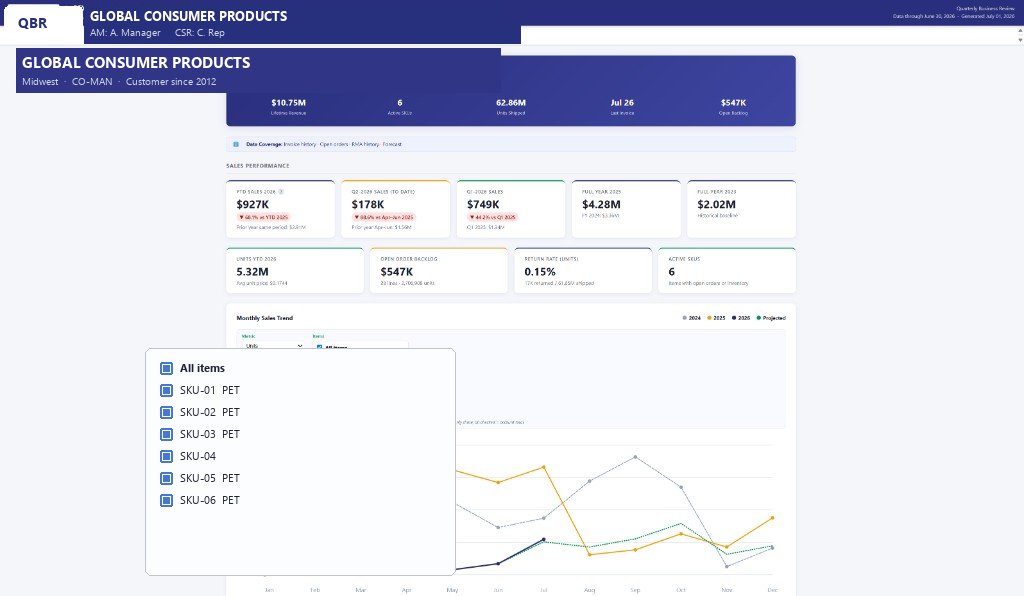
Typical sections:
- Customer summary (YTD sales and units vs prior year)
- Monthly sales and order-to-ship
- On-time delivery and fill rate
- Top items, forecast vs actual, recommended forecast actions
- Returns / RMA
- Open pipeline
The layout is stable because the template is stable. Copilot’s job is to get the right customer into the engine and hand back the file. The screenshot above is a real generated dashboard with account names, logos, and item codes swapped for placeholders.
What I would repeat
- Treat a local Claude Code win as a product to host, not a prompt to recreate. If the Python already computes the truth, wrap it.
- Make the extract schema explicit before you skip it. Excel was the contract that let us prove Copilot delivery without boiling the ERP ocean.
- Design for Copilot timeouts on day one. Async job + poll + SAS link is boring and it works.
- Keep the LLM off the KPI path. Instructions that say “you do not author HTML” are load-bearing.
- Flip data mode behind the same OpenAPI. Copilot makers should not notice Fabric vs Excel except that the numbers stop depending on last month’s export.
The pattern is reusable anywhere a desktop agent built a real report and the enterprise agent is expected to serve it: host the engine, let Copilot orchestrate, put durable data behind the same API when the first file lands.